The GC Said "Go Ahead."
Your Crew Did the Work. Then the Change Order Got Denied.
Try Cooper Free On Your Next Change Order
Your superintendent hits the mic button and rambles. Cooper figures out what the situation calls for — directive confirmation, RFI, daily report, claim notice — and emails back a professionally formatted draft in minutes. No prompts. No menus. No app. Just email.
Confirm verbal email directives in writing before they get denied
Generate RFI requests in minutes
Format daily reports from rough field notes
Escalate disputes & draft claim notices
No app. No login. No training. No new software. Just email
TRY COOPER to [email protected] to get started.
7-Day FREE Trial on All Plans!
Built for commercial subcontractors of EVERY Trade who are too busy to write everything down — and too experienced to keep losing money because they didn't.
⸺ The Problem Every Commercial Sub Knows
Every Verbal Directive You Don't Document Is Margin You May Never Recover.
It happens every single day on commercial projects. The GC walks up to your superintendent in the field and says:
"Go ahead and add those extra hangers.""Move that wall. We'll handle the change later.""Just proceed. We'll sort out the pricing after.""Get your guys on it now — paperwork can come after."
Your crew performs the work. Labor gets burned. Material gets used. Time gets lost.Then the change order comes back: "We never authorized that." "That was already in your scope." "There's no written backup."And your company absorbs the cost. $5,000 here. $12,000 there. $30,000 on one bad job.This isn't bad luck. It is a recurring event on commercial construction projects across every trade, every market, every type of GC. It doesn't happen because your team doesn't care. It happens because your superintendent is running a job — not writing emails.
That is how margin disappears in commercial construction.
One undocumented conversation at a time.
Cooper helps fix that before the trail goes cold. Email a quick voice-to-text note, forward a GC email, or send a rough description of what happened — Cooper turns it into a professional written draft you can review and send while the facts are still fresh.
⸺ How It Works
Three Steps. That's It.
01
Subscribe
Choose a plan and get started. No long-term contracts. No complicated rollout. No IT department required. No training sessions to schedule.
02
Email Cooper
Send rough notes, voice-to-text, forwarded GC emails, spec sections, contract clauses, bid info, or attach any document — from your phone, tablet, or desktop. Rough is fine. That's the whole point.You don't tell Cooper which document you need. Cooper reads the situation and routes it to the right one automatically.
03
Get a Professional Draft Back
Cooper replies within minutes with a polished, well-structured draft ready for your review, editing, and sending. You always control what goes out the door.
Attach Any File Type — Cooper Reads Them All
Less time writing. Less cleanup later. Fewer details slipping through the cracks — and more of your money staying where it belongs.
⸺ What Cooper Does
The Four Highest-Value Tasks Your Team Keeps Meaning to Handle Better.
These four capabilities alone can save your company more than Cooper costs — on a single commercial project.

The CYA Machine
Verbal Directive Confirmation — document field changes in real time, so there's a written record before memories differ.
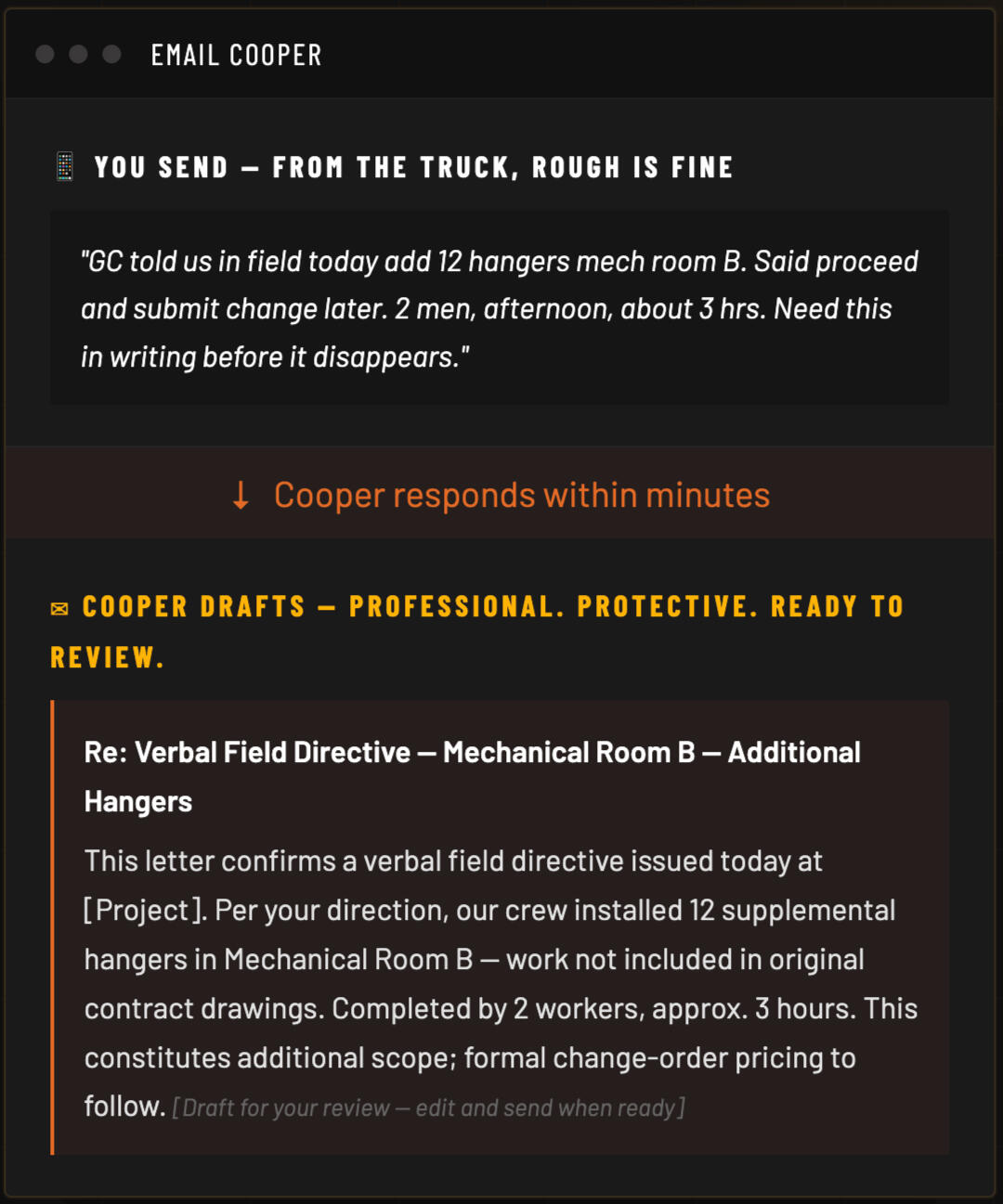
A GC gives your crew a field directive. Your superintendent emails Cooper a rough summary — what was said, who said it, what work was done, and where it happened. Cooper drafts a professional confirmation email documenting the directive, the date, the location, the scope of work performed, and the expectation that any added cost or time will be addressed. Cooper includes a "reply if inaccurate" clause, so the directive is documented in writing, with a date, while the facts are fresh. Send it from the truck. Get it done before lunch.
Construction professionals universally advise confirming every verbal direction in writing. Now your team actually can — from the field, in minutes.

The RFI Generator
REQUEST FOR INFORMATION — GET WRITTEN ANSWERS BEFORE YOU GUESS, SO THE DELAY CLOCK ISN'T ON YOU.
A drawing conflicts with the spec. A detail is missing. The field doesn't match the plans. Instead of guessing and eating the rework, your superintendent emails Cooper the problem — what conflicts, which drawings or specs are involved, and what you need answered. Cooper drafts a clear, professional Request for Information that pins the question to the design team, documents that you flagged it, and notes that work in the affected area cannot proceed until you get direction. Ask the right question. Create the timestamp. Protect the schedule.
A guess in the field becomes your back charge. A documented RFI becomes their delay. Cooper turns the question you'd text into a record that protects you.

Notice of Claim / Dispute Escalation
Dispute Escalation & Claim Notice — protect your position when the GC stops playing fair.
When a GC denies a change order, delays written authorization, issues a back charge, refuses payment, or disputes responsibility after the work is complete, email Cooper the key facts. Cooper drafts a professional Notice of Claim or Notice of Dispute for your review, helping your team document the issue promptly and preserve your position under the subcontract. When "please send the change order" is no longer enough, Cooper helps you escalate professionally — without sounding hostile.
When the GC stops playing fair, silence is not a strategy. Cooper documents your claim, preserves your rights, and escalates professionally — without burning the bridge.

Defensible Daily Reports
Daily Field Reports — turn voice-to-text truck notes into a consistent, dated record of every shift.
Your superintendent sends Cooper rough field notes — manpower, work performed, quantities, weather, delays, access issues, deliveries, inspections, and safety observations. Voice-to-text from the truck is perfect. Cooper returns a structured, professionally formatted daily field report organized for review, filing, or claims support. No PDF forms. No web portals. No reports that never get written because nobody had time. Just email Cooper and get a document that protects you if this job goes sideways.
No web portals. No reports that never get written because nobody had time.
One recovered $15,000 change order pays for more than 5 years of cooper!
⸺ Also Included — Every Plan
Five More Tools Your Field and Office Teams Will Reach For Regularly.
Included in every Cooper subscription at no additional cost.

GC Response Writer
GC Response Writer — reply to pressure, back charges, and disputes without emotion or liability.
Your team receives dozens of GC emails every day requiring professional responses — schedule pressure, back charges, delay claims, RFI follow-ups, and coordination issues. Forward any GC email to Cooper with a quick note explaining your situation. Cooper returns a clear, professional, measured response that addresses the issue, documents the facts, and protects your position — without sounding emotional, defensive, or combative. Respond faster without saying the wrong thing. Keep the relationship intact while keeping your money safe.
Protects your position — without sounding emotional or defensive.

Subcontract Authority & Scope Scanner
Contract Clause Scanner — know who can approve your money and spot one-sided language before you sign.
Forward any subcontract clause or section to Cooper. Cooper explains what the language means in plain English, identifies provisions related to change-order authority, notice requirements, and payment terms, and flags language that appears one-sided or aggressive — so you know exactly what to discuss with your attorney before you sign or respond. Cooper does not replace your attorney. It helps you understand the clause well enough to ask better questions and avoid traps.
Plain-language summary for informational review only. Important contract matters should always be reviewed with your qualified legal counsel.

Spec & Submittal Interrogator
Spec & Submittal Interrogator — find hidden warranty, testing, and submittal requirements in complex documents without reading every page.
Attach a specification section, paste a clause, or forward a drawing detail and ask any question in plain language. Cooper reads it and replies with direct, readable answers citing specific section references — without your PM digging through hundreds of pages or missing a hidden requirement that kills your schedule later. Whether it is a 20-page section or a full spec book, Cooper finds what matters.
Draft review tool only. Technical compliance decisions should be confirmed with qualified project professionals.

Payment & Retainage Recovery
Payment & Retainage Recovery — escalate from friendly reminder to final notice without damaging the relationship.
Tell Cooper who owes you, how much, and for how long. Cooper generates a professional 3-letter escalating draft sequence — a friendly reminder, a firm written request, and a final notice — designed to move payment forward without burning bridges. Each letter calibrates tone precisely: cordial first, firm second, final warning third. Get your money released while keeping the GC relationship intact for the next job.
Draft correspondence for your review only. Collection actions and applicable laws vary by state and situation — review with your qualified legal counsel before sending.

The Construction CYA Catch-All
The Anything-Else Engine — memos, math, summaries, and oddball drafts handled in minutes.
Need a project summary cleaned up? A memo to the owner drafted? An explanation of a field condition turned into professional language? Scattered notes organized into a coherent email? Unit conversions, man-hour estimates, or a quick calculation before the morning meeting? Send it to Cooper. If it involves construction communication, drafting, or documentation, Cooper gets you from raw notes to a polished, professional first draft fast — so you look sharp and move on.
Your construction Swiss Army knife: questions, calculations, memos, and oddball drafts that don't fit the other eight services — handled in minutes, not hours.
About Cooper's Outputs: Cooper generates professional draft documents for your team's review and consideration. Cooper is an AI writing assistant — not a law firm, licensed attorney, certified safety professional, or financial advisor. All draft outputs are starting points for your review. Your team reads, adjusts, approves, and sends. You are always in control of what goes out the door.
⸺ Why Teams Adopt It Fast
Built for the Way Commercial Subcontractors Already Work.
Every year, someone sells you a new platform. New login. New app. New training. New process your field guys resist for three months — until everyone quietly stops using it and you're still paying the subscription.By the time your superintendent figures out the new system, the moment is gone. The field note never got written. The conversation never got confirmed. The window closed.
Cooper does the opposite.
It works through email — because your company is already running on email every day. Every person on your team already knows how to do this. Nothing to install. No onboarding session. No IT ticket.Your superintendent can voice-to-text a field note before he drives away. Your PM can forward a GC email on the way to the next site. Your owner can request a collections draft from the kitchen table at 9 PM. Your estimator can clean up proposal language the night before bid day.Same workflow your team already uses. Dramatically better output.
Owners & Principals
Protect margin on every job. Improve documentation consistency across your teams. Reduce the communication gaps that cost real money — without adding headcount or overhead.
Project Managers
Draft better GC emails in minutes instead of hours. Stay ahead of documentation instead of playing catch-up. Forward the hard emails and get professional responses without the stress of wordsmithing at 7 PM.
Superintendents & Foremen
Turn rough voice-to-text notes from the field into professional written documentation before conversations become disputes. Get daily reports done from the truck in minutes — every day.
Estimators & Bid Managers
Produce cleaner proposals faster on bid day. Ask spec questions without reading 400 pages. Clean up proposal language before it goes out under your company's name.
CFOs & Office Managers
Generate professional collections draft sequences for aging receivables. Improve the quality and consistency of outgoing project communication. Reduce admin burden on field staff.
⸺ Security & Privacy
Built for Sensitive
Project Communication.
Cooper is designed for subcontractors handling real project documents, real contract language, real field directives, and real financial communication. We take the sensitivity of what you send seriously.

Private, Controlled Infrastructure
Your data is processed inside our controlled environment — not routed through public consumer AI tools like ChatGPT, Google Gemini, or other third-party public services.

Not Used to Train AI Models
Your project communications, contract language, and field documentation are not used to train public AI systems or shared with any third party.

Restricted Access Controls
Access to systems and project data is strictly limited and controlled. Cooper is built for business-critical communication — not open consumer chat interfaces.

You Control What Gets Sent
Cooper generates drafts for your team to review, edit, and approve. Cooper never sends anything on your behalf or takes autonomous action. Every output goes out only when you decide to send it.
Cooper is hosted on enterprise cloud infrastructure with security controls and operational safeguards appropriate for sensitive business communications. For legal, contractual, safety, or financial matters, all Cooper outputs should be reviewed by appropriate company personnel and, where applicable, qualified advisors before use.
⸺ Pricing
Straightforward Pricing. No Surprises.
No Long-Term Contracts.
Before you look at the numbers: one commercial extra denied due to lack of written backup can cost $10,000 to $100,000+ in unrecovered labor, material, and time. One confirmed directive draft, produced in four minutes, can prevent exactly that.
7-Day FREE Trial on All Plans - If You're Not Satisfied, Cancel Before Day-8 and Pay Nothing
Starter
Best package for owner-operators and single-super shops
$149/mo
or $1,490/yr — save 2 months
| Sender Addresses | 1 email |
| Daily Cooper Requests | 20/day |
| All 9 Capabilities | ✓ |
| All File Formats | ✓ |
| Priority Processing | - |
| Email Support | ✓ |
Professional
Best for small field and office teams running multiple active jobs
$199/mo
or $1,990/yr — save 2 months
| Sender Addresses | Up to 3 emails |
| Daily Cooper Requests | 60/day |
| All 9 Capabilities | ✓ |
| All File Formats | ✓ |
| Priority Processing | - |
| Email Support | ✓ |
Enterprise
Best for growing subcontractors with multiple active project teams
$299/mo
or $2,990/yr — save 2 months
| Sender Addresses | Up to 10 emails |
| Daily Cooper Requests | 200/day |
| All 9 Capabilities | ✓ |
| All File Formats | ✓ |
| Priority Processing | ✓ |
| Email Support | ✓ |
$4.97
Cost per day on the Starter plan — less than a cup of coffee from the job trailer.
~4 min
Average time from rough field note to professional draft back in your inbox.
$15,000
One recovered change order pays for over 5 years of Cooper.
⸺ Faq
Common Questions
⸺ Get Started Today
If Your Team Can Send an Email, They Can Use Cooper.
Turn rough jobsite communication into professional written documentation — before it costs you time, money, or margin you worked all year to earn.Every day without written confirmation of verbal directives is another day your profit is exposed. Every sloppy GC email response, every unformatted daily report, every missed scope change in a coordination email — these are recurring, measurable costs your company is absorbing right now on active jobs. Cooper closes that gap. Starting with the next field conversation on your next project.
Questions? [email protected] · siteconcierge.ai

© 2026 SiteConcierge.AI — All Rights Reserved. Cooper is an AI writing assistant. All outputs are draft documents for your team's review and are not legal advice, safety compliance guidance, or professional consulting of any kind. Review all outputs with appropriate company personnel and qualified advisors before use.